top of page

​关注IT

  • sinokap-it-service-weibo-logo (1)
  • tmall(%25E5%25B7%25B2%25E5%258E%25BB%25E
  • bilibili(已去底)1
  • White Facebook Icon
  • 白LinkedIn圖標
  • White Twitter Icon
  • 白色的YouTube圖標
  • wechat(已去底)

AAK-SHA 会议大屏参会使用说明

  • 6月11日
  • 讀畢需時 2 分鐘

已更新:7月2日


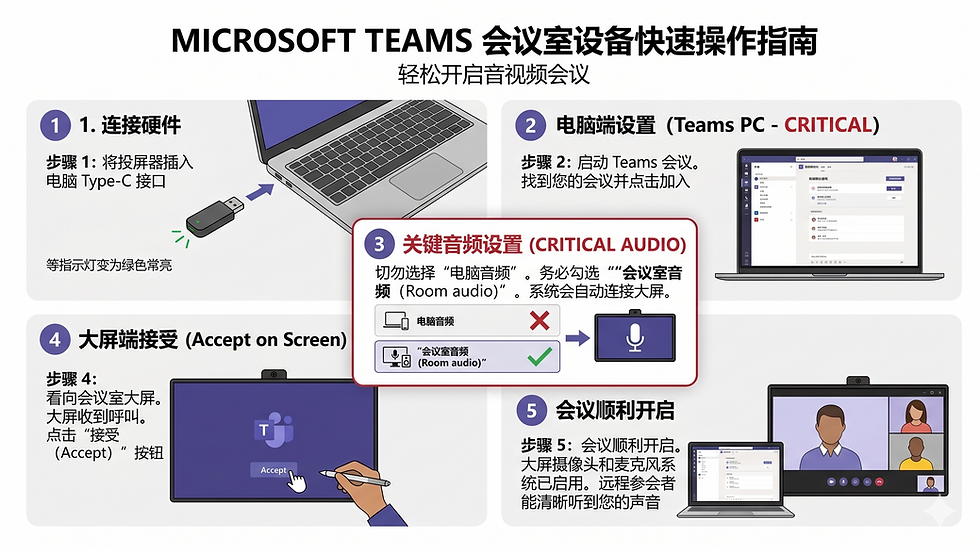
本指南旨在帮助您在会议室使用 Teams 时,确保远程同事能清晰听到声音。


1. 硬件连接 (准备工作)

1.1 插入投屏器: 将 Yealink 无线投屏器插入电脑的 USB-C 接口

1.2 确认灯光: 等待投屏器指示灯从闪烁变为 绿色常亮。这表示电脑已成功连接到会议室主机。


2. 启动会议 (Teams 客户端)

2.1 打开 Teams 客户端。

2.2 找到需要加入的会议加入/开始会议 (Join/Start meeting)


3. 核心步骤:切换音频(⚠️ 最关键!)

在进入会议前的设置界面,必须 进行音频切换,否则远程端将听不到声音。

●      务必勾选 “会议室音频 (Room audio)”

目的: 启用会议室大屏专业的 Yealink 麦克风阵列,实现 360° 拾音。

错误选项: 如果选择默认的“电脑音频 (Computer audio)”,将只使用笔记本自带麦克风,导致远程端失音。

●      点击 “立即加入 (Join now)”。此时电脑会显示“正在呼叫 会议室名称...”。


4. 大屏确认 (完成入会)

4.1 观察大屏/触控平板: 屏幕上会同步弹出入会邀请提示。

4.2 执行接受: 点击屏幕上的 “接受 (Accept)” 按钮。


快速故障排查

常见问题 (Q)

解决方法 (A)

远程反馈听不到声音

立即挂断,重新加入,在预入会界面务必改选“会议室音频 (Room audio)”。

投屏器指示灯一直闪烁

检查 USB 接口是否插紧,或更换另一个 USB-C 接口重新初始化。

大屏没有弹出“接受”按钮

检查电脑端是否已点击“立即加入”并显示“Calling...”状态。


留言


Contact Us

Hotline: +86-21-3129 0541 

Address: 7th Floor, Jing An Kerry Center Tower 2, No. 1515 West Nanjing Road,Shanghai 200040 PR, China

E-mail: aak-support@sinokap.com

About Sinokap 

Sinokap provide 7x24 IT support in China with a high IT Policy standard for IT Service to make sure our clients can focus on their main business. 

Sinokap design flexible IT Service packs and Management plans for each company.We have served SME’s from more than 200 cities in China and have been helping MNC’s set up offices in China.


Sinokap's technical solutions include IT on-site delivery Service, IT Outsourcing Service, IT Infrastructure, IT Consulting Service, VPN Solutions, Internet Solutions, Microsoft service, Server and Network Maintenance.

Sinokap believes "Knowledge And People" will driving force for Sinokap to become top IT Service provider in Asia Pacific region.

Site Map

Follow Us

  • sinokap-it-service-weibo-logo (1)
  • tmall(%25E5%25B7%25B2%25E5%258E%25BB%25E
  • bilibili(已去底)1
  • wechat(已去底)
  • 白色的Twitter圖標
  • 白色的YouTube圖標
  • 白LinkedIn圖標
  • 白色的Facebook圖標

© 2026 Sinokap Technology Co., Ltd. All Rights Reserved.

sinokap-it-service-sinokap-logo-white-pi
sinokap-it-service-sinokap-logo-white-le
bottom of page